Life in Rapture

My dream last night, in part, was this:

I am renting an apartment in Rapture, the undersea city in the game Bioshock.

It’s a pretty nice modern apartment, very clean and minimal (unlike the apartments in the game). Everything is going well, but then there is a power failure. I am watching TV at the time, and it is on a battery backup, so I don’t immediately notice. But then I look out the window, and the city is all dark.

There is rumbling and a crash, and the power comes back on. Everything seems ok, but I gradually notice sprays of water throughout the apartment. One wall cracks, and water then begins to gush in.

“That’s what I get,” I think to myself, “for getting an apartment at the bottom of the ocean.”

Then I woke up.

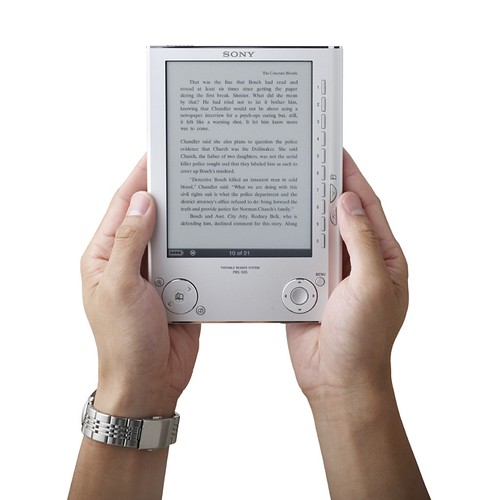
More PRS-505 Details

From Sony’s site:

What are some of the most important changes between the PRS-500 and the PRS505?

  1. The PRS-505 has a new screen that has a faster refresh than the PRS-500’s screen and is also a bit lighter. The new screen also supports 8 shades of gray vs. 4 on the PRS-500.
  2. The User interface is much improved with:
    • Page turn buttons moved the right side of the Reader
    • The Numerical numbers now match up against the screen so when menus are displayed the appropriate button is to the right of the entry.
    • The Menu key is now by itself and clearly marked
    • The Jog stick is gone replace with four way arrow buttons and a center enter button.
  3. Books have become easier to search as there are now tools that sort the books into alphabetical groupings for Titles or Authors.
  4. The PRS-500 had a single storage media slot that could handle both SD or Memory Sticks. These cards could support either 2GB (SD) or 4GB (MS) for a maximum external storage of up to 4GB. The PRS-505 has two slots in parallel that allow for SD and Memory Stick Duo cards. These cards can support up to 2GB (SD) and 8GB (Memory Stick Duo). Because there are two separate slots the total amount of external storage the PRS-505 can support is up to 10GB.
  5. The USB functionality is much improved
    • The PRS-505 supports the USB 2.0 standards which allow for faster transfer of data.
    • The PRS-505 can be charged when the battery is empty from the USB port of almost any PC even if there is no software loaded on it. The PRS-500 needed to be plugged into a PC running pre-installed software before it can charge and even then it could not charge if the internal Reader’s battery was dead.
  6. The Connect Reader software is being replaced with “eBook Library v 2.0” which does look and work much like the older software. The only noticeable difference is that with a PRS-505 the new software can use a new Auto-sync feature. Please note that the PRS-505 cannot work with the older Connect Reader software.

Sony Reader v2 is out

Sony announced an updated version of their eBook Reader (PRS-505)!

Differences from the old one (PRS-500):

  • 8-shade greyscale instead of 4
  • Improved page turn speed
  • Twice as much internal storage (now 128MB)
  • Memory is accessible directly as a mass storage device over USB
  • Improved button layout
  • Now comes in silver or dark blue instead of just dark blue
  • Improved screen contrast
  • Automatic Sync option
  • Lower price (now $300, was $350)

Will I get one? Well, you know me, so probably. I really like the v1 one, and better refresh speed, contrast, and more shades of greyscale would all be good features to have.

Back in the game

I got Family Tree Maker 16 “Collector’s Edition” – normally like a hundred bucks, but got it for like $35 on Amazon. It comes with a year’s subscription to Ancestry.com, so I was poking around to see if I could find any documents. It’s been a while since I’ve done any research, so it was nice to get back into it.

I found a picture of the S.S. Campania, which my great-grandparents Samuel and Annie Aidinoff took to America. I found the ship’s manifest a while ago, but always nice to have photos, even if they are generic.

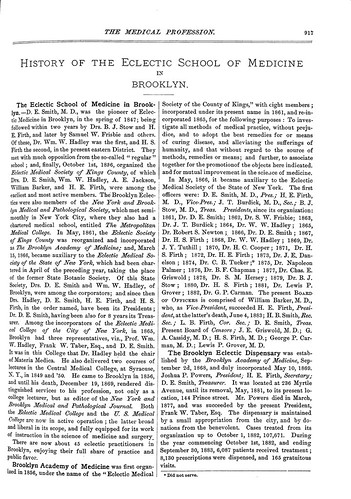
I also found some listings of my great-great-grandfather, Horatio Firth, who was a doctor in Brooklyn.

Nothing really exciting yet, like more branches on the ol’ family tree, but still looking.

Uuurgh

I’ve been getting these stabbing pains in the side of my head today. Every so often, like maybe once every couple minutes, it feels like my left temple is caving in.

I wonder if it’s tooth pain getting mapped incorrectly, or if the veins in my temple are slowly failing as I spiral unknowingly towards oblivion…

It seems to be happening with increasing frequency, a couple times a minute now.

Always disconcerting when things go wrong with my head… I’m very fond of my brain and prefer it stay intact…

Gaaah… probably tooth-related, I have a couple teeth that need some work, but I was waiting until January when my dental insurance resets, otherwise I have to pay it out-of-pocket.

Just need to meditate, I guess. It’s all in my head, after all. =)

A couple Advil couldn’t hurt, too.

Probably doesn’t help that the AC is messed up and it’s 80 degrees and humid in my cube.

Amazon MP3s – Initial Experience

I decided to try out the new Amazon MP3 service before going to bed.

The first thing I noticed was that for previews, Amazon uses RealPlayer. I’m not a big fan of RealPlayer, as in the past it was an invasive app that had all sorts of control panels and took over all media playing functions. Maybe it’s not like that anymore, but I didn’t really want to install RealPlayer. So instead, I opened iTunes. The albums I was looking at were available in both Amazon and iTunes, so I used iTunes to listen to previews.

After listening to a few clips, I decided on an album to download:

The Sunset Tree, by The Mountain Goats

It is $9.99 on iTunes, and $8.99 on Amazon.

When I click to buy the album, Amazon alerts me that I have to download and install their “tiny app” to complete the sale. Uh-oh. I am suspicious. Is this a tracking app, or controlling my usage, or just bloatware?

I download an install the app. It *is* pretty tiny (under 600k), and seems to be just a file download queue system. I set it to not automatically add the downloaded songs to iTunes (I’ll put them on the media server and link to them from there).
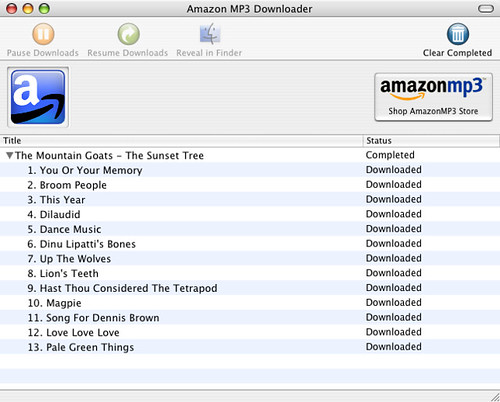
I complete the checkout, and it prompts me to download a .amz file, apparently a download queue list for the downloader app. The files start downloading. The process is quick.

Once they are done, I copy the files from that directory to the media server downstairs, and add links to them to the iTunes library.

I listen to the album as I sync the songs onto my iPod.

Overall, the whole process was quick and pretty easy. I’ll have to install RealPlayer if I want to hear preview clips, not something I’m happy about, but other than that, they have a better product than Apple.

Amazon has a higher bitrate (256 on Amazon vs. 128 on iTunes), more universal file format (MP3 vs. Apple’s AAC), no DRM, and cheaper prices than Apple! I may never buy from iTunes again.

Warning shot, or direct hit?

Today Amazon either fired a warning shot across iTunes’s bow, or hit them directly in the mast.

They announced a beta of an Amazon Music store… with DRM-free music, meaning you can (gasp) use it however you want, on whatever player you want!

And…drumroll, please… the songs are *cheaper* than iTunes.

Average iTunes song: 99 cents.
Average Amazon song: 89 cents.

Average iTunes album: $9.99
Average Amazon album: $8.99 (and some are cheaper!)

Amazon Music Store

Non-DRM’d music – maybe someone finally gets it!

I’ll have to try it out when I get home, see if it’s easy to use, and if there are any hidden catches.