Not to Scale

I went to the doctor today. He said I had damaged a ligament, not a disc. Which is good news, but will still take a while to heal. Hopefully it doesn’t snow for a while.

Part of getting my vitals taken was being weighed. I discovered my scale is not only inconsistent, it is also inaccurate.

My scale gives a range of readings, depending on where I stand on the scale.
Front of scale: 143.0. Middle of scale: 145.6. Back of scale: 146.4.

The doctor’s scale, which I’m guessing is more accurate, came out thusly: 137.

Definitely time for a new scale, methinks.

The ONE thing a scale is supposed to be good at is determining your weight…

He One Spinal Cracker

My back’s been bothering me – not severely, but intermittently – ever since one of the many rounds of shoveling this winter.

This morning I decided to try stretching, to see if I could get my back to snap back into place or something.

I made it worse. =(

Now it hurts a lot more… my theory is that it’s a slipped disc, since prodding my spine, I can feel a very tender spot between two of my vertebrae. However, it could also be a micro-fracture, or muscle-related.

I think I’ll try and schedule an appointment with my doctor, to get a spinal x-ray to figure out what’s going on.
Then I can figure out if I need a chiropractor, a lot of massage, or a back brace. =P

Cinna-Yum-Yum Sticks

I was about to make myself some Hastings Cakes for dessert, when I thought, “why not try a variant?”

So here are Cinna-Yum-Yum Sticks.

Ingredients:

1 Joseph’s Flax Pita
3 Tbsp. Egg Beaters
1 Tbsp. Milk
1 tsp. cinnamon
1 tsp. sugar

Slice the pita into strips.

Mix the egg, milk, cinnamon and sugar in a bowl.

Soak the strips in the mixture and fry them.

I did it in two batches so that I could lay them out evenly in the pan and have room to flip them.

I also used oil spray to keep oil usage down.

They turned out pretty good.
There is a small hint of grain flavor under the cinnamon and sugar, but not enough to detract from the overall flavor.

A yummy snack.

Nutrition

Calories: 118
Fat: 2g
Sat. Fat: 0g
Cholesterol: 0.3mg
Sodium: 430mg
Carbohydrates: 18g
Fiber: 6g
Sugar: 7g
Protein: 12g
Calcium: 90mg

He created universes

Gary Gygax just died. I never knew him, never met him, but he was one of the primary architects of my childhood.

He created Dungeons and Dragons, which in its various incarnations served as a hub, a jumping off point for wild imaginings and storytelling in the most classic and ancient meaning of the word.

Storytelling not by repeating a tale, but from weaving it, crafting it on the spot with input from any number of active listeners. Not passive listeners, but listeners who can help steer the tale. Listeners who will be mentally and emotionally invested in a tale if it is well-told – they will meet new friends there, look forward to cameos from old favorites, and fight monsters and villains.

I always enjoyed D&D, when I was running a game, I cared more about creating interesting characters, memorable moments, fun puzzles, than I did about the actual *rules* of the game. Sure, they were there, but I looked on them as a resource to be tapped when needed, not as the driving force.

I can’t count the number of times I played D&D late into the night with friends, only going to sleep when our bodies simply failed to function, then awoke to start right on playing.

I remember a time that D&D saved me. It was when I was going to Lotus Land School (later renamed Jordan Glen School) in Archer, Florida. I was probably around 10 years old. There were these two boys, I don’t even remember their names, but they would bully me all the time. On the tennis court they would hit balls at me as hard as they could, trying to peg me. Or they would knock me down, or throw my books. I remember one time, they were chasing me through the school, it must have been after hours, since the classrooms were empty. As I fled, I knocked chairs over behind me, causing them to trip and swear and try to catch me even more.

I realized I didn’t have a plan of escape. In one of the rooms, I stopped and turned to them. “Wait,” I said, “have you ever heard of D&D?” They stopped, puzzled, and I told them about it. They didn’t really get it, so I dispensed with all the rules, pared it down to its essentials, an interactive story.

So we started to play. I discovered the best way to keep them interested and enjoying the story were to add more ribald bits, so I made sure the barmaids were all buxom, and of course, in fantasy worlds there are no STDs…

But it was then that I realized the real power of intellect, of creativity. From that point on, I never knew anyone I considered an enemy*. Imagination, it turns out, is a pretty powerful thing.

So anyway, Gary, who I never knew, thank you for your worlds, and for showing me how to create my own.

*ok, there were two people since then that I have called “nemesis”. One I no longer have a problem with, and the other is hopefully long dead.

More Macs

Adam decided his Mac Mini was just gathering dust in his room, so I bought it from him.
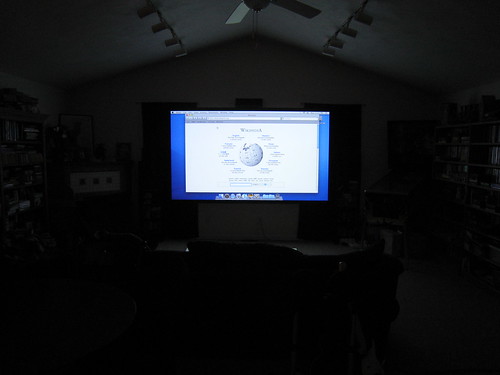
I’m gonna hook it to my projector and use it with my wireless keyboard and mouse.
Dunno if I’ll use it much either, but it can’t hurt to have a lil computer in the living room.

Now I can check IMDB and Wikipedia without leaving the couch…

Surround Sound and the Mac Pro

So I made a discovery about the Mac Pro (and Macs in general) – they do not support the 3 mini-jack surround system that 90% of Windows and Linux machines use. Instead, they will only output surround sound through an optical port.

I looked at my options, listed here in order of expensive-ness.

Option 1:
Give up on surround sound, either use current surround system in stereo mode, or get new 2.1 channel system.

Option 2:
Get Griffin FireWave, which will output 3-mini-jack surround via firewire. Downside? No windows drivers, so if I booted into windows, I wouldn’t have sound. One of the main reasons I want surround sound is for windows games.

Option 3:
Use optical to 3-mini-jack converter box. Not a bad option, Creative makes one, but it’s discontinued and I didn’t have any luck finding it.

Option 4:
Get a new surround sound system that has optical support.

I ended up going with option 4, and got a Logitech Z-5500 system for $250 (yowtch).

It arrived yesterday, and I was unprepared as to how massive it is. Everything is literally twice the size of my old surround sound system. Physically, and power-wise. The subwoofer is the size of a Volkswagon.

I managed to untangle the old surround sound and set it aside, and somehow managed to squeeze the new speakers into the same places. Except the subwoofer. It came with a warning to keep it far away from your computer, so I moved the Mac to the other side of my desk, and put the subwoofer on the bottom of my wire shelf. It *just* fit.
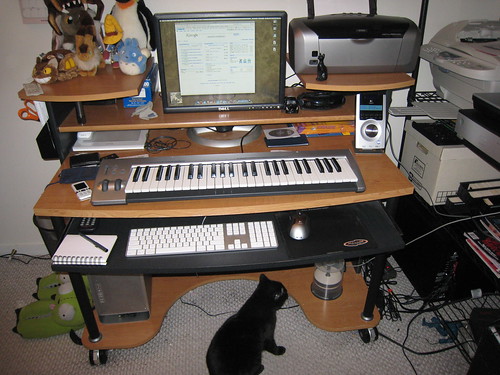

(click the image for more details)

Finally having it set up, I noticed a few things:

1. You have no control over output when using optical out (a digital signal) – this means the mac outputs at a fixed level, and you can *only* control the volume using the surround sound’s volume knob. This means the volume + and – on the keyboard no longer work. Adjusting output levels in individual apps does still have an effect, I wish I could map those keys on the keyboard to iTunes volume + and -, but haven’t found a way to do that yet.

2. In windows, the Mac internal speaker is on all the time. To silence it, you have to go into the volume control panel and turn the Master Volume all the way down. Now sound will just come out of the surround sound system.

Aside from the price, the physical size, and those couple quibbles, I’m happy with it – it sounds great (though I only use a fraction of the volume available).

One thing happened that lessened my fretting about having spent too much on speakers.

When setting up the speakers, I moved my old subwoofer, and noticed a pile of rolled coins and a bowl of coins under my desk that I’d sorta forgotten about. Every day I take the spare change in my pocket and toss it in the bowl, and every now and then I’d roll them up with a coin sorter. Over time, a small pile of rolled coins had built up. I hadn’t rolled any in several months, a thick layer of dust and cat hair covered the pile.

I dusted it off, and took a half-hour and rolled the loose coins. At first I used the coin sorter, but it kept jamming, so I did it by hand instead.

Humans are really good at pattern recognition. I dumped the coins a couple handfuls at a time into a pile on the floor. First I grabbed all the quarters, as quickly as I could. I was impressed how little of a quarter had to be showing out from beneath other coins for me to find it. Finding a quarter and grabbing it was seemingly faster than conscious thought, my brain was doing all sorts of size, color and weight analysis without my having to think about it. After the quarters, I did the dimes, then the nickels, then the pennies. I also found a couple John Adams dollar coins in there. John Adams has a dollar coin now? Who knew?

When all the coins were rolled, I counted it up. $354.00 (not counting the two John Adams dollar coins, a Susan B. Anthony dollar coin, and two bicentennial quarters that I set aside to keep). Wow. It paid for the new surround sound, and then some!

Addendum: By toggling the Feature Key/Function Key setting in the keyboard control panel, I reassigned F1-F3 to exposé, F4 to dashboard, and in CoverSutra assigned F7-F9 to Previous/Pause/Next, and F10-F12 to Mute/Vol -/Vol +. So now those keys control the volume in iTunes instead of trying to control global volume, which doesn’t work with optical out.

iPhoto Flaws

Apple’s iPhoto is a decent program for managing your photos.

Not fantastic, not terrible, but adequate.

There are a few glaring omissions, things that seem like basic features that are missing from iPhoto.

No MD5 tracking
This sounds complicated, but MD5 is a common method for “fingerprinting” a file. Comparing MD5 fingerprints can tell you if a file is a duplicate. iPhoto does some sort of basic comparison to prevent duplicates, but it fails so often it must be only looking at the filename or timestamp or something. It’s badly flawed, and essentially broken.
This means if you bring in a lot of photos you have built up, you will probably have tons of duplicates in there. There are third-party solutions for this, but nothing built in to iPhoto.

No way to merge Libraries
iPhoto stores all the images in a “Library” – which is essentially a directory structure with some XML data. But for some reason, iPhoto has no way to merge libraries. So if you had iPhoto on one computer, and then got a new computer with iPhoto, you can’t just combine the old Library into the new one. You can choose to view one Library or the other by holding down the option key when you start iPhoto, but you can’t combine them. Sure, there are hacks and third-party apps, but that just accentuates the basic flaw: when choosing “import”, iPhoto doesn’t recognize its own file format (the Library).

No auto-rotation of photos
Most modern digital cameras have a sensor to detect the orientation of the camera when the photo is taken. So if you tilt the camera sideways to get a vertical shot, the image is tagged in the metadata as being rotated. Yet iPhoto ignores this, meaning you have to manually go through all your photos and rotate them. Lame! The metadata is there, use it!

A couple of these things (duplicate detection and auto-rotation) seem to *sometimes* kick in (perhaps when you import from a camera, but not when you import from a HD?), but not with any reliability.

Honorable mention:

No Quicktime Quicklook
You can use space to view a photo in iPhoto, but to view a quicktime in iPhoto, you have to double-click it.