Eclipse suckage

So I tried the upgrade from the standalone Zend Studio 5.5 to the Zend Studio 6.0 plug-in for Eclipse.

Eclipse is somewhat nice, but, like many open source projects, sadly flawed in some basic functionality.

One feature, in particular, has me livid.

It doesn’t have soft text wrap.

What does this mean?

Well, say you have a long line of code.
In any other IDE, which is to say, GOOD ones, you can turn soft text wrap on, which puts a virtual line feed at the edge of the window. Anyone who has used any text editor, from Word to Xcode, is familiar with this. It means when you are typing, when you hit the edge of the window, the cursor comes back to the beginning of the line, even though you didn’t hit return. When you resize the window, the text re-flows to wrap at the new window size.

However, apparently no one who wrote Eclipse could figure it out, despite the fact that EVERY OTHER FUCKING TEXT EDITOR IN EXISTENCE HAS IT!

It means that for code on a long line, you must constantly use the horizontal scroll bar. Which is extremely annoying to me. It may seem like nitpicking, but when you code for a living like I do, it’s important that the text editor you use for coding is comfortable and efficient and doesn’t waste your time with a lot of extra unnecessary clicking and scrolling.

Some people like scrolling horizontally, the people who wrote Eclipse LOVE IT, but for god’s sake, don’t force everyone to use your preferred settings! Any decent IDE would have a simple checkbox at least, to turn soft text wrap on or off.

So far the only thing I’ve found is a hack someone wrote which *sort of* enables soft text wrap in Eclipse. Except from what I read, it breaks some other things, and is buggy. And hasn’t been updated since it’s first alpha release in 2006.

Sigh.

Just, sigh.

And, GAHHH!

Update:

I just read through the feature request on the Eclipse website, apparently people have been clamoring for soft text wrap for YEARS (starting around 2002), but the developers didn’t build the feature in at the beginning, and now can’t figure out how to add it. So their solution is to just ignore requests for it.

Choice excerpts of user comments from the feature request:

“I can’t personally think of any other text editor that does not support this. ”

“I don’t suppose it could be given priority over other features, as an
embarrassing design omission of a REALLY REALLY basic text editor feature?

I don’t mean to be obnoxious, but it feels to me like “putting doorknobs on the
doors will be hard to fit in because there’s so many doors, and we’re really
busy putting pool tables in the game room, and rotating shelves in the library,
and auto-darkening windows.” (Please take that in the humerous spirit it was
written…)”

“I would say this problem is the most critical in eclipse text editor as I don’t
know ANYONE who does not want that.”

“It’s a pain to see Eclipse missing such basic features.”

“I think it doesn’t sound good for an all-round development tool
like Eclipse to miss a basic function like this one.”

“There is a real demand and lots of people are surprised that Eclipse
does not do such a simple thing.”

“Ok, so despite 78 votes for this bug (which probably makes it one of the top
voted for Eclipse bug, if not the first), this was not scheduled for 3.2, for
3.3 and now not for 3.4…”

A Ride and a Crash

Went for a bike ride on Saturday with Sarah. We stopped at a bike shop on the way to the rail trail and got her tire adjusted and inflated, then found a parking spot at the head of the trail.

It was a perfect day, in the low 80’s but with cool breezes. The rail trail was busy, but not crowded – we would have to pass someone every few minutes, but mostly it was open trail.

On either side of the trail are farms and trees, with occasional views into the surrounding town, flashes of gas stations and restaurants through a break in the trees. There is an ice cream and polish food shop on the side of the trail at one point. We didn’t stop there but we did last time we were on the rail trail. It’s a nice little mom and pop shop with good food and ice cream.

We rode on, through a few intersections, through a couple tunnels, all the way to the other end of the trail, about 9 miles. We rested a bit and then headed back. After only a few feet, we quickly turned around – Sarah had left her camera on one of the picnic tables there. When we got back a nice couple was holding it for us, we retrieved it and headed out again.

We stopped at a beaver dam to look at it and the numerous dragonflies, Sarah managed to get a couple decent shots of a dragonfly, even though they would fly away if you got too close. We wondered about the beavers themselves, I posited they might be nocturnal and all asleep (we looked it up later, I was right).

Then we headed out again and that’s where things got bloody.

We were cruising along, when all of a sudden, Sarah’s bike wobbled, swerved, and she went down. Hard.

My blood ran cold, for two different reasons.

Firstly, it looked like she went down hard enough to have possibly broken something, and could be badly hurt. We were close to a town, but far enough that getting to help might be difficult, especially if she had a broken leg. Luckily, we had brought our cellphones, she had quipped as we headed out “you know, in case we need to dial 911.”

At the same time, I was worried that she would never want to go bike riding again. I flashed to my friend Mike who got into a car accident and basically decided never to drive again.

The rail trail is paved, which makes for a smooth ride, but a very hard and painful landing.

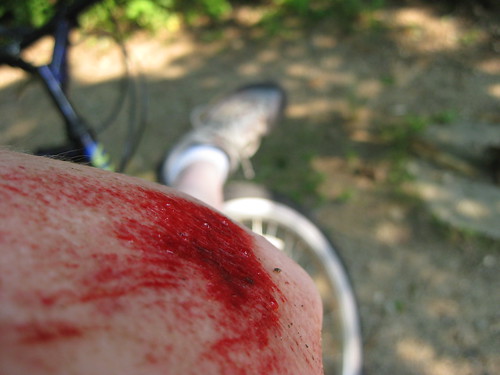
She had pitched off the bike partway sideways, partway over the handlebars. I pulled up and hopped off my bike. There were ragged bloody patches on her knees and arms, and her leg was stuck between the handlebars and the frame. I lifted the handlebars up so she could get her leg out, then I helped her get sitting up.

She had held out her hand as she fell, so her wrist took a hard impact, and hurt the most. Her fingers had bent backward when she hit, and her pinky was very tender to the touch and swollen. She tried to move her pinky and wrist, they still had circulation and movement, but she almost passed out when she first tried to move them. I sat with her, trying to think what to do next. She didn’t seem badly injured enough to warrant an ambulance, but she was too injured to ride 8 more miles back to the car. As we were, we were in the woods, but near a road. It seemed like if I got the car we would have a lot more options, we could drive to a hospital to get an x-ray, or if nothing seemed broken, we could go to Sarah’s and get her patched up.

A woman walked up and asked if Sarah was okay, if we wanted her to call an ambulance or anything. Sarah said no thanks, that she was hurt but didn’t think she needed an ambulance.

After a bit, Sarah seemed a little less dazed, and I got on my bike to ride back to the car. I felt bad leaving her alone on the trail. I marked our location on my iPhone’s GPS, and took off down the trail as fast as I could.

I’m no Ben Peck, but I made pretty good time back to the car. I put my bike in the back of the car and gave Sarah a call to let her know I was on my way. I had a little difficulty matching the iPhone location with the map on my Prius, I wish both would just show me the lat and long coords and let me punch them in manually.

After a little trial and error I found Sarah. I strapped her bike to the car, and we went into town to a pharmacy for Sarah-patching supplies. We sat in the park and I acted as nurse’s assistant in washing the wounds with saline and bandaging them up, since Sarah’s right wrist and pinky hurt too badly for her to use them. Then we went to a brewery/pub to get some lunch and get Sarah some much-needed beer.

iPhone has the slowest sync in the known universe

When you sync the iPhone, if you have made any changes to the apps you have on the phone, it does a full backup when you sync. Which for me, is pretty much every time.

A full backup is I N C R E D I B L Y     S L O W.
I haven’t timed it, but I would say between an hour and an hour and a half.
Which is a fucking long time, especially if you are trying to sync some podcasts and get out the door on your way someplace.

What I don’t understand: why isn’t it an incremental backup? If 95% of my iPhone is unchanged, why take over an hour to sync the whole thing, instead of taking 5 minutes to sync the part that changed?

It’s really, really frustrating. You also can’t use the iPhone while it’s syncing, so you can’t use it to call someone to tell them you are running late because your iPhone is taking FOREVER to sync!

My First iPhone App!

Ok, so it’s only a tiny step above “Hello World”, but it’s the first iPhone app I wrote.
Every time you press the “Roll” button, it generates a number between 1 and 20 and shows it to you in a message.

That’s it. The other buttons don’t do anything yet.

But you gotta start somewhere, right? =)

Now I’m tired and it’s time for bed.
But I feel good that I’ve started to make some visible progress, even if it’s only a little bit.

Stinky Garbage

Last Monday Adam threw out some turkey burgers.

By Thursday, the kitchen reeked of rotting meat, so he took the trash down to the garage.

So now the garage reeks of rotting meat, and the smell has pervaded our cars, and seeped into the basement, so it also reeks. The smell has slowly climbed the stairs and is now oozing out the basement door.

Trash day isn’t till Tuesday, so we’ll have two more days of stink, plus however long it takes for the smell to fade.

Damn Adam and his rotting meats!

iPhone mini-review

So I got the new iPhone on Friday… here’s a cursory review of plusses and minuses.

Hardware

Form Factor
Comfortable in the hand, not too heavy or light.
Smooth edges, and the glass screen is comfortable to use.
There are only 5 buttons on the whole thing: volume up/down and mute switch on the side, sleep button on the top, and home button on the front.
Headphone jack is functional (guess the last version of the iPhone had issues)

Screen
Bright, crisp, nice.
Some people have complained that Apple shifted the color temp to be warmer than the previous iPhone, which is slightly yellow from absolute white, but it’s subtle, not really enough to complain about. Since it’s just a system variable, maybe they will release an update that lets you pick color temp.

Speakers
Decent sound from such small speakers.

Camera
Unimpressive. It’s 2MP, which is about as low as you can go and not be blurry as hell.
About average for American cellphones, but on the low end for international (where 5MP is common).
There is no video capture, not sure if that’s a software or hardware limitation.
If it’s a software limitation, I can see that being added by a firmware update or 3rd party app.

Docking Port
This is typical Apple-dicking-you-ness. It uses the same port as my iPod, so the sync and charging cables I have work fine… except for the car adaptor. The iPhone says “this cable was not designed for the iPhone” when I plug it in. Typical of Apple, they have a chip in the accessories that prevents them from working with other devices that they OUGHT to work with.

So I had to buy a new 12v voltage adaptor. Which is weird – the power comes from a 12v car -> USB adaptor. The old one didn’t work, but the new one does. Wouldn’t USB be the same voltage either way? I suspect it’s a chip in there somewhere telling it to work or not. Stupid Apple.

Software

The App Store
The App Store is fantastic. It could use some more organization, perhaps, but has tons of apps and the developers set the prices. Some apps are free, but the average price for most apps is $5-$10. Not bad.

Stability
This is something Apple really needs to work on. Granted, I’m installing a whole mess of 3rd party apps, but sometimes if an app goes down, then every subsequent app seems to crash on launch. The solution for this seems to be to power the iPhone down for 20 minutes or so, then power up again. I’m guessing this has less to do with 3rd party apps, and more to do with the underlying stability of the iPhone OS.

Built-in Apps
These are pretty good. As I mentioned before, no video capture, not sure if that’s a hardware or software limitation.

Browser
Very nice, though really needs Flash support. Adobe, Apple, kiss and make up, and make this happen.

iPod
Pretty good, but wish that it showed more data. There are plenty of ID3 tags that it doesn’t show, and song names are truncated with “…” if they are too long. Also, if you are listening to music, to pause it, you have to unlock the phone, tap iPod if you don’t have it running, then tap pause. Not as quick as an iPod where you just hit the Play/Pause button.

Oh, it’s a Phone, too

Actually, I barely use it as a phone, but the couple times I did, it worked nicely. Even though my AT&T signal isn’t great, it’s better than the reception I got with T-Mobile.

Lasers!

Went to see Rush this weekend with Ray and his girlfriend… They had smoke machines, pyrotechnics, a tiny mechanical Neil Peart, and LASERS!

The iPhone does’t handle shots in low light very well, but here’s a pic anyway.
photo.jpg

This is also a test of posting to LiveJournal from my phone via email.
It’d be nice if someone wrote an iPhone app for LiveJournal posting…

Live from NJ

This is my first post from my new iPhone!

I’m in NJ visiting my friend Ray, and yesterday he was nice enough to go with me to the Apple store to wait in line.
Which turned out to be *really* nice of him… AT&T or Apple were having technical issues, so it ended up being a wait of epic proportions.

I wanted to get there early, so we got up just after 6, stopped for some coffee, and got to the Apple store around 7. There was a pretty big line already, we were about 100th in line.

When the store opened, the line was moving pretty decently, but as time passed it got slower and slower. We chatted music, politics, and culture with other people in line; Apple handed out water and munchkin donuts; Ray went and got bagels for us; still the line moved at a pace between a crawl and not at all.

One man next to us had to give up after waiting hours, he had appointment to get to.

The woman next to us, a nurse, was relieved to find out a meeting she was supposed to go to was cancelled – she could keep waiting with us.

Finally I got inside – at just after noon – FIVE hours of waiting.

The network was still down, I bought the phone but couldn’t use it until activating it on Ray’s laptop later in the day.

But I have to say, the iPhone *is* pretty damn cool.

A breakfast of Pain

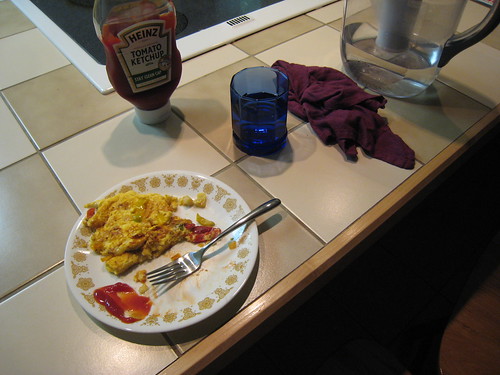
I managed to make a fairly decent-looking omelette this morning. Normally I mangle them and they turn out as Scombelettesâ„¢, a sort of patchwork scrambled omelette.

But this morning I used a smaller pan, lower heat, and realized that omelettes are folded, not flipped. It didn’t come out perfect, but it was a lot closer to an omelette shape than I’ve come before.

Then I sat down and began to eat my creation, reading a magazine article about the sound design in Wall-E.

Chew, chew, chew, CRUNCH!

CRUNCH?

I had just bit into my tongue. Hard.
I’ve bit my tongue before, but this was by far the biggest gash I’d made in the ol’ word-waggler.

(It doesn’t look that bad in the photo, but that cut is pretty deep)

After stanching the flow of blood with several paper towels, I found my tongue now alternates between feeling fine and feeling a aching, stabbing pain, like a toothache in my tongue, causing me to wince.

Two hours later, it’s still like that. Fine, fine, fine, fine, PAIN.

Any kind of food or drink brings on the pain. So until it gets better, I guess I’m fasting, maybe gently sipping some water to stay hydrated.

=(

OS X filesystem madness

So most of last week I spent working on a few bugs in the Catalog Builder, a web-based application I wrote with a few other people at Staples.

The particular bug I was working on was seemingly impossible to fix, and it was driving me to the point of madness. I had it fixed on my local machine, but when I would copy that change to the test server, it wouldn’t work.

Thursday I was determined to fix it once and for all. I stayed at work until around 10 or 11pm, but finally went home in failure, near tears of frustration for not being able to fix it.

The next morning, my manager Asha sat next to me while I once again copied my change from my local machine to the test server. It still didn’t work. Then she had me do it one more time, and miraculously, it WORKED!

I chalked it up to exhaustion, figured I must have made a mistake on Thursday night, copied the wrong file up to the server or something.

But today, I thought about it – I had been very careful on Thursday night. There had to be some other reason that my good code seemed bad on the server. My first conjecture was that there was some issue with the directory names.

I did some poking around, and figured it out.

There is something really odd about the way Mac OS X treats symbolic links.

A symbolic link is a “fake” directory or file, that is actually a pointer to a real file. This is useful if you need a certain file or directory to appear to be in several places, while in fact it’s only in one place. This is better than making multiple copies of the file or directory, because if you have to make changes to it, you only have to change it in one place, since symbolic links just point to the original path the file or directory is in.

Which is the important point.

in Unix, a symbolic link is a marker that points to a path. If you “cd” (change directory) to the symbolic link, it goes to the path indicated.

On Mac, an alias is a marker that points to a folder. If you click on the alias, it goes to the folder indicated.

The difference arises if you move the target directory.

The symbolic link points to the path, so it would say the target dir is missing.
the alias points to the folder, so it would still open the folder, even if it were moved.

And the real trouble is that OS X treats a symbolic link BOTH ways. When you create a symbolic link in the command line, it does TWO things. It creates a unix symbolic link, but also creates an alias in the GUI.

In the GUI, the alias will point to the original FOLDER no matter where you move it. In command line or via webserver, it is a symbolic link, and points to the original PATH.

So when I moved the original folder to the trash, then replaced it with a new folder with the same name as the old one, I would go through the GUI to update the files, then through the webserver to view it… but going through the GUI I was updating the files in the trash (new path, old folder), while viewing the files was showing the ones in the original path (old path, new folder)…

It was this inconsistency that drove me to the point of madness on Thursday.